Luci vs eMoods

Luci vs eMoods

Two private mood trackers that keep your entries on your phone. One is a daily chart made for people managing a mood disorder with their doctor. The other is a mood journal built to show you what moves your mood. Let's go over the categories one by one to see which app is stronger where.

Updated November 27, 2026Compared: Luci 4.3.0 and eMoods 1.3.28

eMoods has been around longer than almost any other mood tracker. It was first built in 2010 for people living with bipolar disorder, and its full name is still eMoods Bipolar Mood Tracker. It is made by Yottaram LLC, a company registered in Maine, has been downloaded more than half a million times on Android, and holds a 4.8 rating on the App Store. The idea has barely changed in all that time. Once a day you mark your highs, your lows, your sleep and your medication, and once a month you have a chart to take to your doctor.

Luci shares more with eMoods than with most apps in this series. Both work without an account, both keep your entries on your device, and both can produce a report for a professional. The difference is what a day looks like. In eMoods a day is one line on a chart: the most depressed and the most elevated you felt, how irritable and anxious you were, how you slept, what you took. In Luci a day can hold several moods, each with the people, places, activities, sleep and weather around it, and the app reads them back to you in plain words.

So the real question is who the record is for. eMoods is built for the appointment. Luci is built for you, on the days in between. Each of the nine sections below looks at one category, gives both apps a fair hearing, and names a winner. The table at the foot collects the verdicts, and the conclusion says who should pick which.

The two apps in brief

Luci

Version 4.3.0

A mood tracker and guided journal that finds the patterns behind how you feel, and keeps everything on your device.

Luci logs a mood in one drag, lets you tag what was going on around it, and turns those entries into plain-language observations about what moves your mood. It doubles as a journal, with free writing and over 550 guided prompts. It is made by a small independent team, needs no account, and does its analysis on your phone.
eMoods

By Yottaram LLC · Version 1.3.28

A private daily mood chart for tracking highs, lows, sleep and medication, with a monthly report to share with your doctor.

eMoods, in full eMoods Bipolar Mood Tracker, is made by Yottaram LLC and dates back to 2010. Once a day you mark your depressed mood, elevated mood, irritability and anxiety on a four-step scale from none to severe, along with sleep, medication, and a few optional points such as weight, talk therapy and the menstrual cycle. The app turns that into a monthly graph and a printable PDF report. There is no account, and nothing is stored outside your device. An optional subscription adds your own tracking points and timestamped notes. Its makers also run eMoods Insights, a separate tracker in the cloud, and a sibling app called eMoods Wellness Tracker. This page compares the phone app. It runs on iPhone, iPad and Android, in seven languages.

Look and feel

How the app looks, how it feels to use, and how fast an entry is on a day when you have no patience for it.

Luci

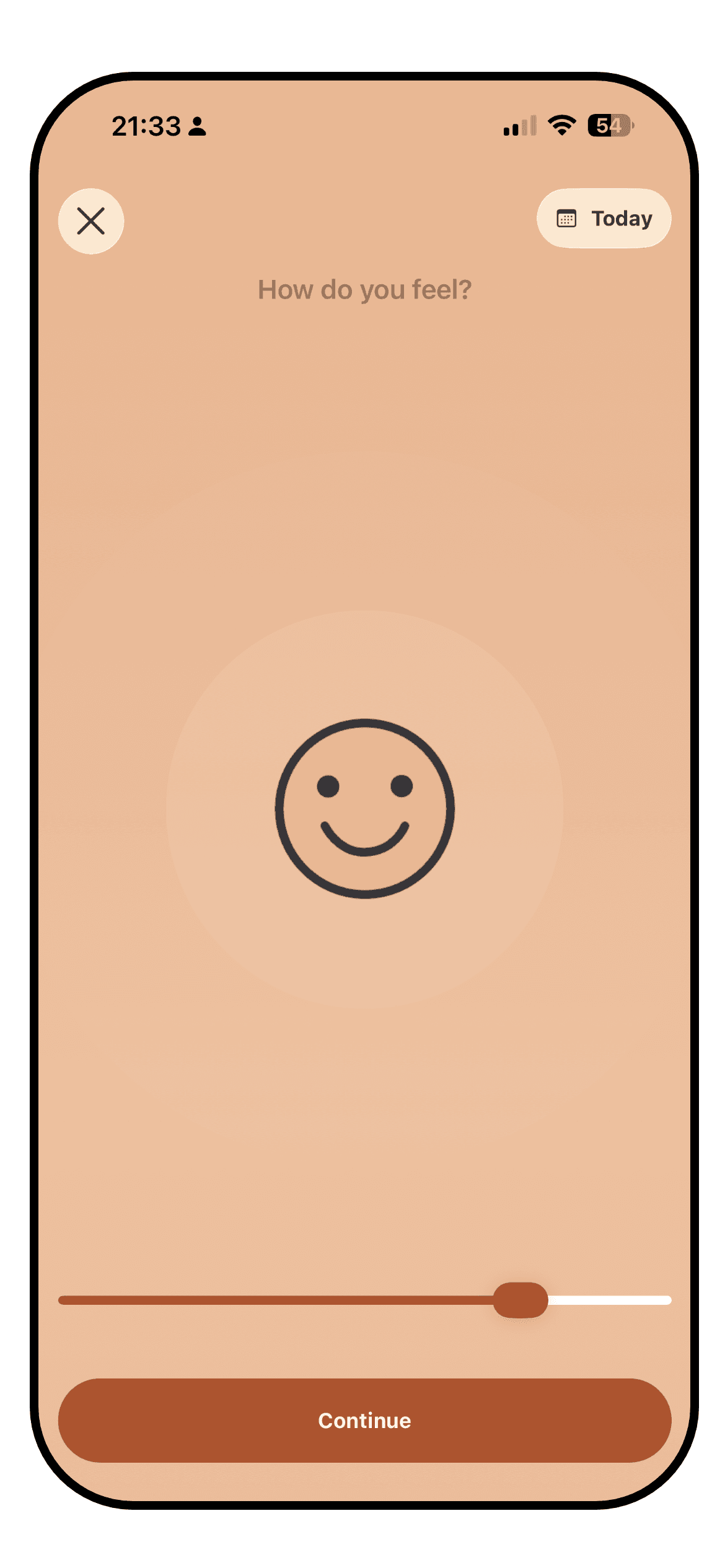
The Luci mood entry screen with the slider mid-drag and influence chips below it

Luci opens on a slider. You drag it to where your mood sits, on a simple, standard or detailed scale shown as numbers, smileys or one of the illustrated icon packs, and that drag on its own is a complete entry. Everything else is optional: the activity, emotion, people and place chips underneath, a photo, a note. The screen is warm and unhurried, with a lot of white space, and the mood is always the first thing you see.

The cost of that depth is a busier interface once you start using it fully. Chips are grouped by kind, so the entry screen grows as you add things to track, and the statistics tab is a stack of cards that rewards a scroll. Luci is warm and tidy, but it asks for more of your attention than a chart you fill in once a day.

eMoods

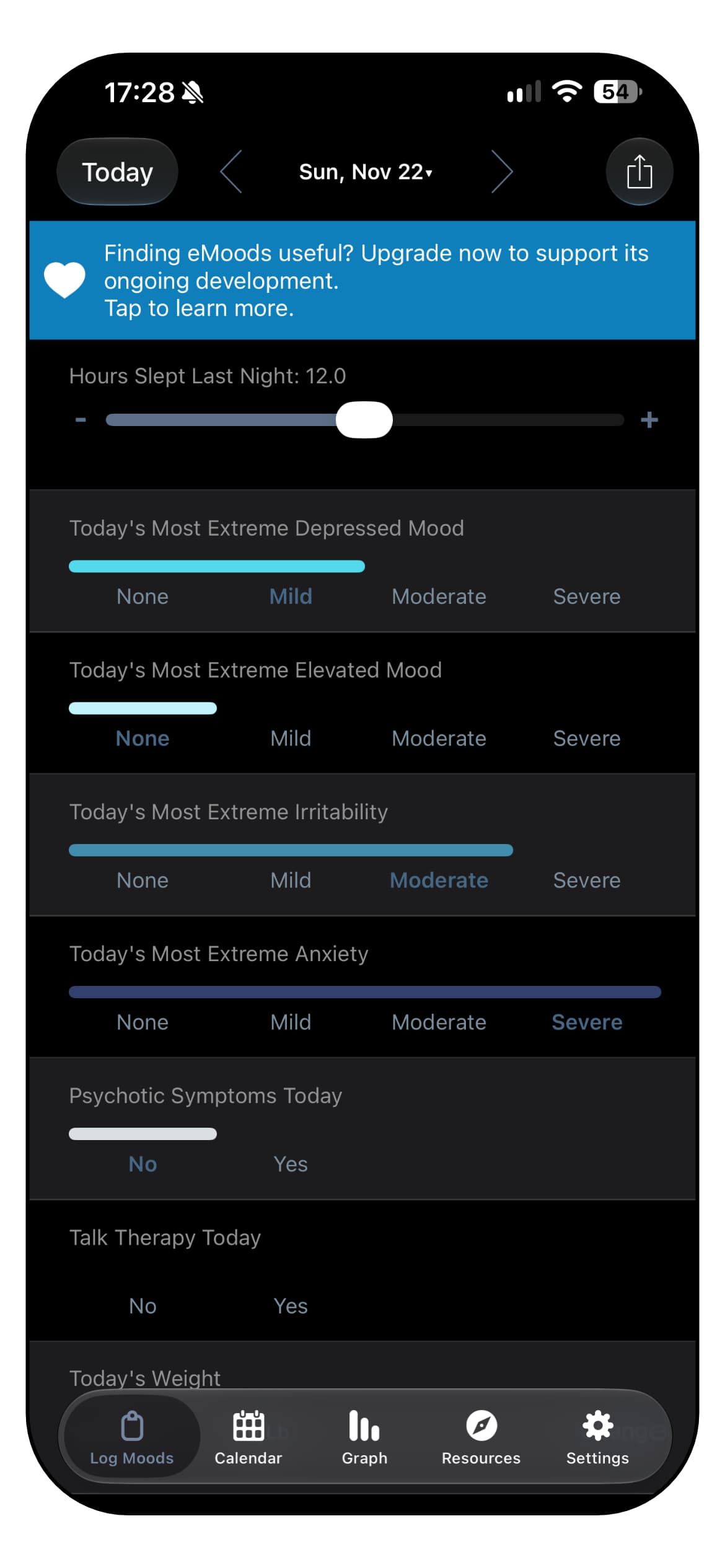
The eMoods daily entry screen with an upgrade banner, a sleep slider and mood scales from none to severe

eMoods is plain on purpose. A day is one screen you scroll through: a slider for the hours you slept, four moods to mark from none to severe, a few yes or no questions, your medications and a note. Its makers call simple and effective the two things the design is for, and its listing promises tracking in seconds. Nothing celebrates, and nothing asks for more than the day's facts. There is a dark theme and a colorblind-friendly color scheme, and the iPhone app was updated for Apple's Liquid Glass design in December 2025, so it looks at home on a current iPhone.

It also reads like a form. The words are clinical, as they need to be: depressed mood, elevated mood, psychotic symptoms. There is one entry a day, and it records the extremes of that day, so a morning and an evening that felt nothing alike end up on the same line. On the free app a banner at the top of that screen asks you to upgrade. If you want an app that feels warm, or one you can open several times a day as your mood shifts, that is outside what eMoods sets out to do.

WinnerLuci

Luci. eMoods is quick, plain and consistent, and for a daily chart that is a strength. Luci is warmer, a check-in can be a single drag, and you can log as often as your mood changes. It also gets busier once you track a lot.

Insights

What you can learn from your own entries once you have a few weeks of them: charts, correlations, trends, and how clearly they are explained.

Luci

The Luci statistics screen with a trend line and ranked influences

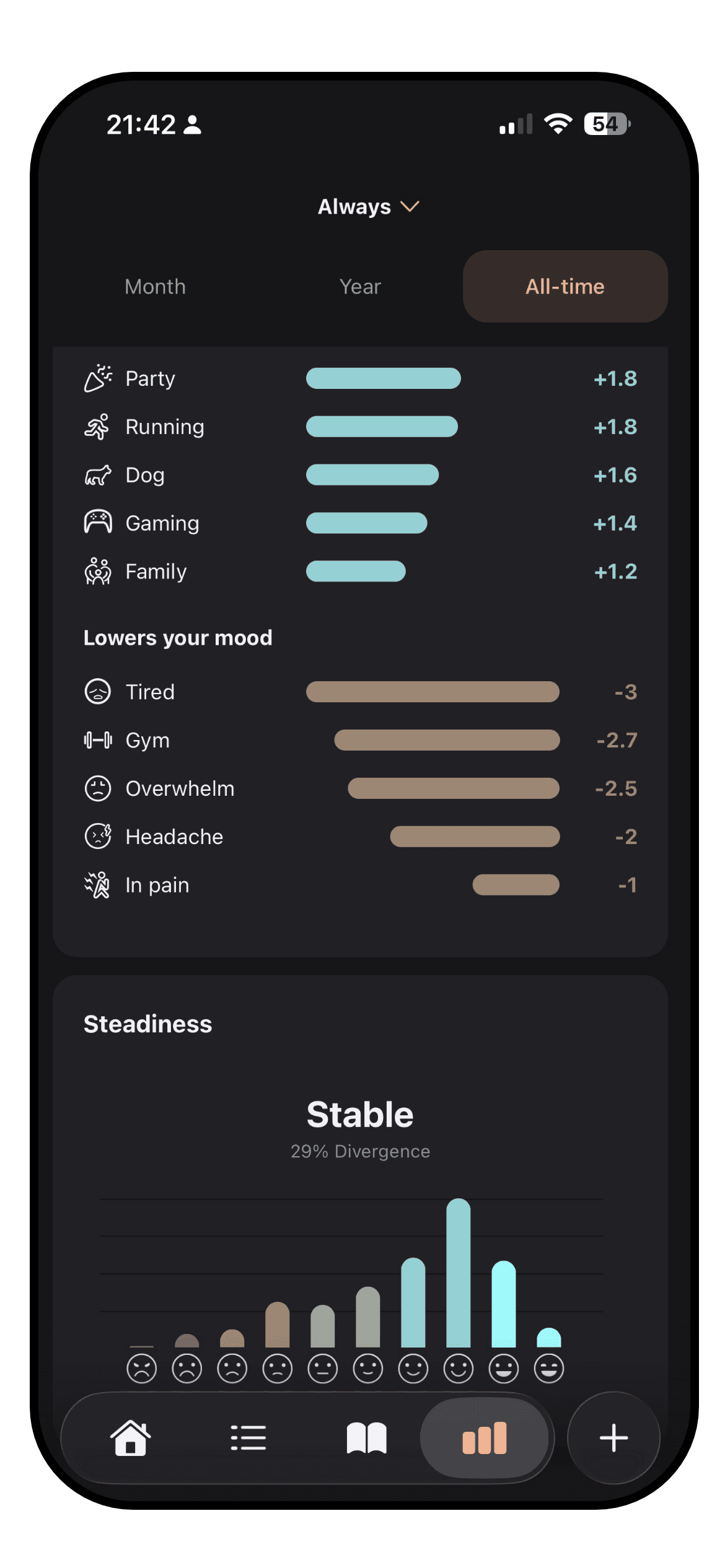
This is the category Luci is built around. Every entry can carry a lot of information, from people, places, activities and emotions to sleep and the thoughts you had. Luci reads across all of your entries and says, in a sentence, what tracks with your better and worse days. It ranks each thing you tag by how far it shifts your average, so you can see that a particular meeting costs you more than a short night does. Each observation says how many entries it rests on, so five weeks of evidence carries more weight than five days.

Under the plain-language patterns are the charts: mood trend over any period, averages you can compare month against month, mood steadiness, time of day, day of the week, weather, location, steps and a word cloud drawn from your notes. The period in pixels view stretches from a single month to your whole history. It all runs on your phone, with no connection or account required, and the pattern discovery is part of the free app.

eMoods

The eMoods graph of the last 30 days with sleep, the four moods and yes or no tracking points

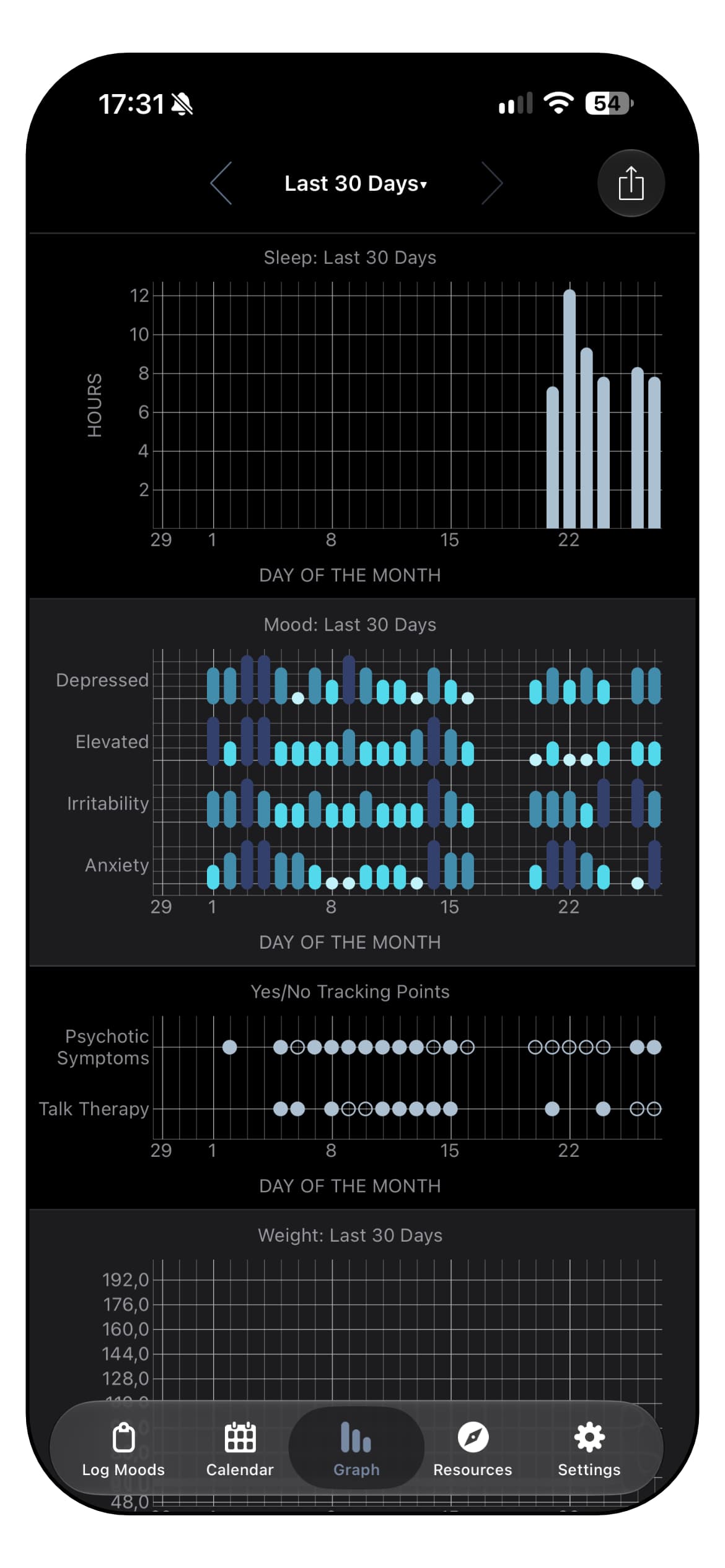
eMoods shows a month as a stack of graphs. Hours of sleep come first, then depressed and elevated mood, irritability and anxiety as a colored mark for each day, then your yes or no points and your weight. Medications sit on the graph too, and a change of dose shows there, so you can see what happened in the weeks after it. There is a calendar, and an option to show moon phases beside your entries. The monthly report puts the same data on a page you can print.

What it does not do is interpret any of it. Its listings and help pages describe no averages, no ranking of what goes with better or worse days, and no patterns written out in words. Spotting a trigger is left to you and your doctor, reading the chart together. According to its help center, reports older than six months need the subscription. Charts that plot one tracking point against another are part of eMoods Insights, the separate cloud tracker.

WinnerLuci

Luci. eMoods gives you a clear monthly chart and leaves the reading to you and your doctor. Luci ranks what moves your mood by size, says how much evidence each pattern rests on, covers far more of your day, and does it all on your phone for free.

Customization

What you can change: the mood scale, the things you track, the icons, the colors, the layout.

Luci

A long list of user-added activities and emotions in Luci

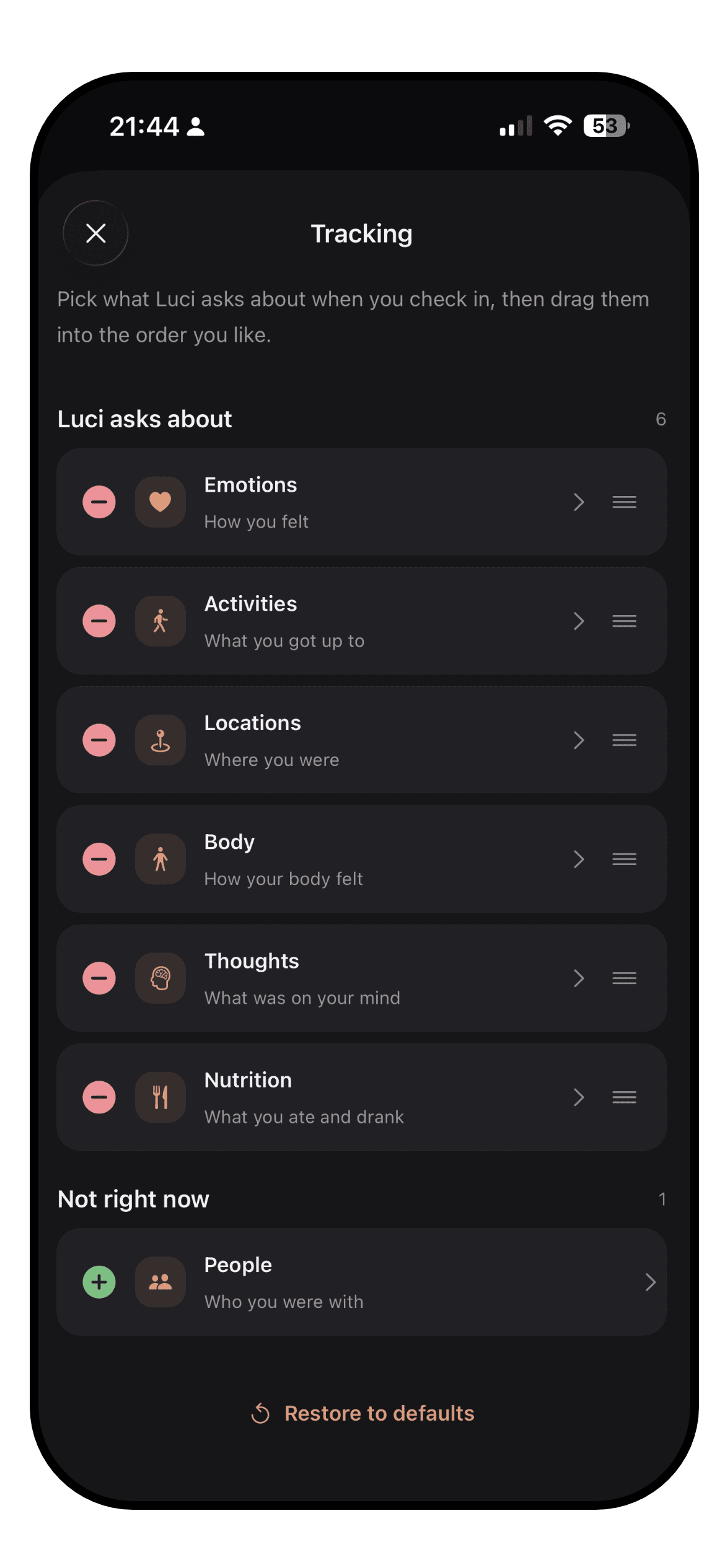
Luci lets you choose the mood scale itself: simple, standard or detailed, shown as numbers, Roman numerals, smileys, or one of five illustrated packs with cats, dogs, frogs, ghosts and glimmers. Everything you track is a chip you can add, rename, remove or pin, across activities, emotions, people, places, nutrition, physical state and thought patterns. The cards on the home screen and the statistics screen can be added, removed and reordered.

Looks are covered too. There are eight color themes, each in light and dark, and the extra themes and icon packs are unlocked with Sparks, which you earn simply by logging. The colors of the mood scale follow the theme you pick.

eMoods

The eMoods Default Tracking Points settings, with a switch for each point from sleep to weight

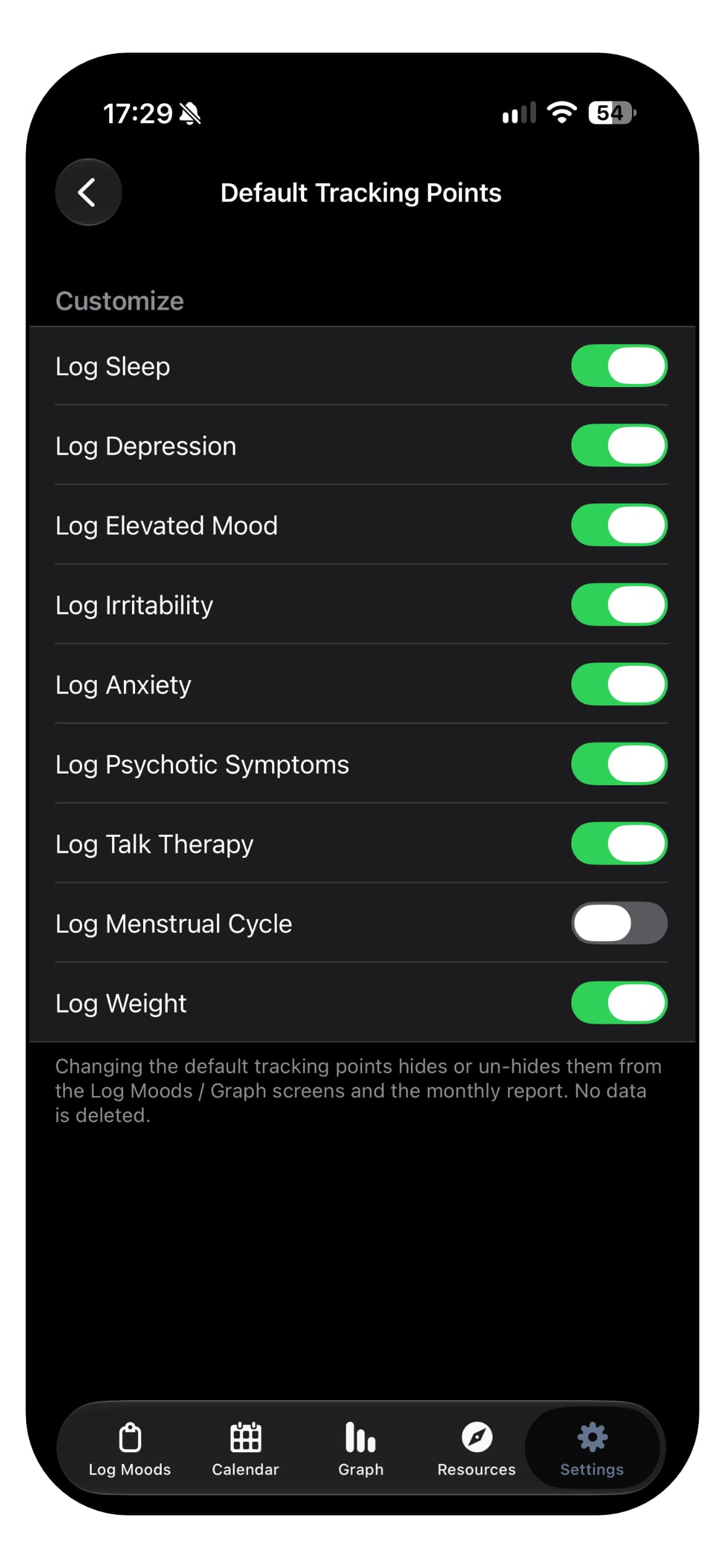
In eMoods you decide what the daily form contains. Each of the nine default points, from sleep to weight, has its own switch, and switching one off hides it from the daily screen, the graph and the report without deleting anything. The medication list is yours to write, with doses, and anything can go on it, coffee included. With the subscription you can add tracking points of your own in three kinds: a low to high scale, a yes or no, or a number such as cups of coffee.

The look is mostly fixed. There is a dark theme and a colorblind-friendly scheme, and subscribers can change the app icon. The mood scales themselves cannot be changed, and custom tracking points are a paid feature. The printed report also has room for only nine to twelve of them.

WinnerLuci

Luci. eMoods lets you trim its form and, on the paid tier, add points of your own, with scales and numbers where Luci has chips you select. Luci lets you choose the mood scale and the icons, edit every chip for free, pick a theme and arrange the cards on screen.

Journaling

How good it is as a journal, for people who write more than a line. Formatting, prompts, photos, voice, and reading it back.

Luci

A guided journal prompt in Luci, part-way through an answer

Luci is a journal as much as a tracker. A note can use headings, bold and italics, and carry photos and voice notes. When the blank page is the obstacle, there are over 550 guided prompts across twenty topics, from stress and grief to money and motivation, each with optional guidance on how to approach it and a short tip drawn from cognitive behavioral therapy at the end of a session. You choose the topic, or take the daily prompt.

Because prompts repeat, Luci can show what you wrote last time the same question came round, which is the clearest evidence of change most people ever get. Your notes also feed the statistics: the word cloud and the journal moments card read them back to you. And on the days you want no prompt at all, the page is blank and yours.

eMoods

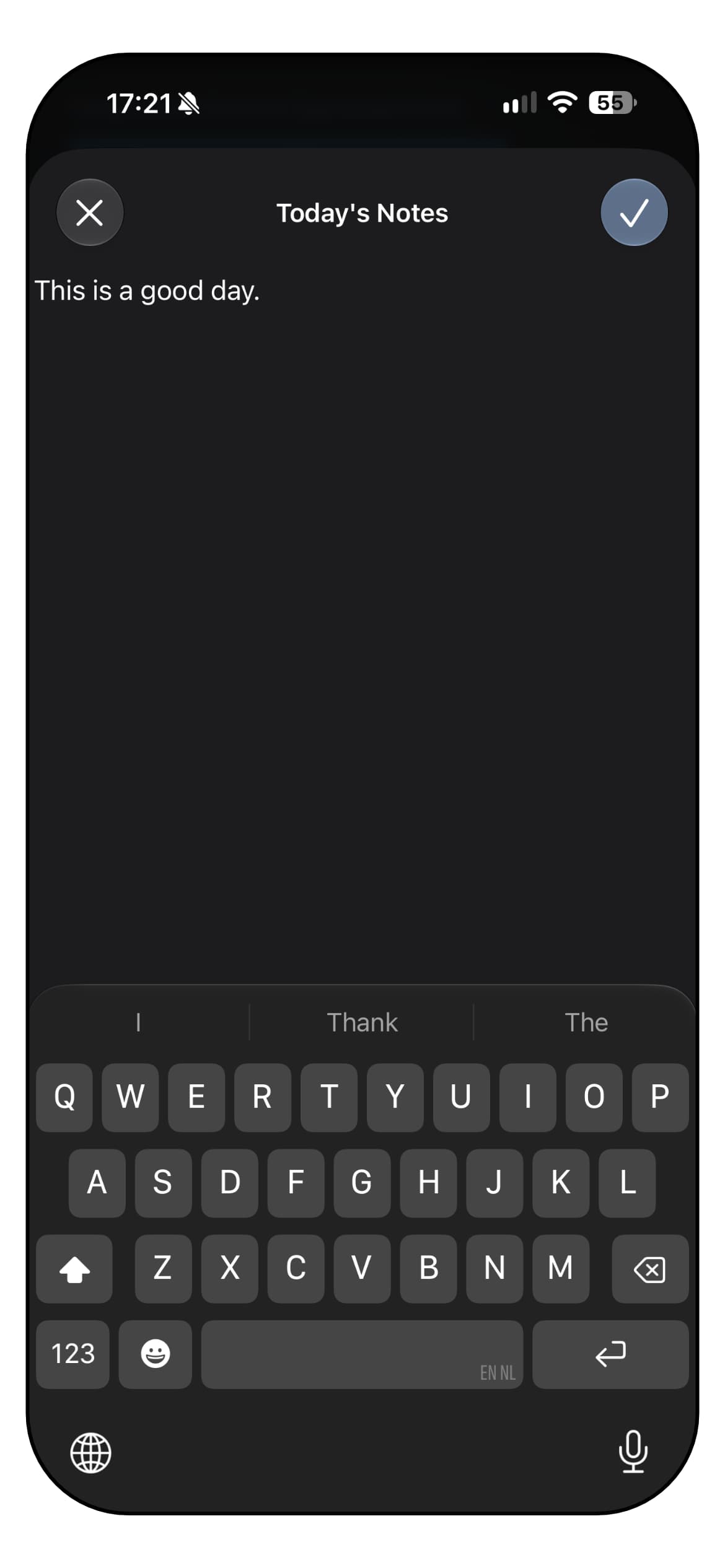
The eMoods Today's Notes screen with one line of plain text

eMoods calls itself a mood diary, and the diary is Today's Notes, a text field on each day. It is a good place for a line about what happened. With the subscription you can add timestamped notes, several a day, each marked with the time you wrote it. Its help center suggests using one to record a difficult episode while the details are fresh.

That is the extent of it. The note is a blank page of plain text, with no guided prompts, photos, voice notes or formatting, and a recent Play Store reviewer wished old notes were easier to find again. eMoods is a chart with room for remarks, and it does not try to be a journal.

WinnerLuci

Luci, by a distance. Over 550 guided prompts, formatting, photos and voice notes, against one note a day and timestamped notes on the paid tier. For a line of context next to a chart, eMoods has what it needs.

Other features

Everything outside the core loop: goals and habits, reminders, widgets, articles, achievements, watch apps.

Luci

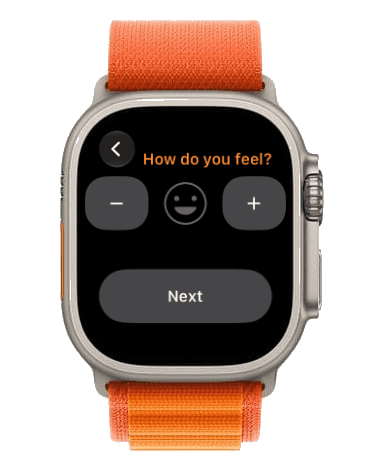
Logging a mood in the Luci app on an Apple Watch

Outside the core loop Luci has home screen and lock screen widgets, an Apple Watch app with its own complications, reminders, and a set of mental health articles on topics like thinking traps and CBT that cite their sources at the foot of each piece. Logging earns Sparks, which unlock themes and icon packs, and there are achievements for keeping at it.

What Luci does not have is anything built around a treatment routine. There are no medication schedules, no dose reminders and no structured experiments. A habit or a medication can be a chip whose effect on your mood you can see, and that is as far as it goes.

eMoods

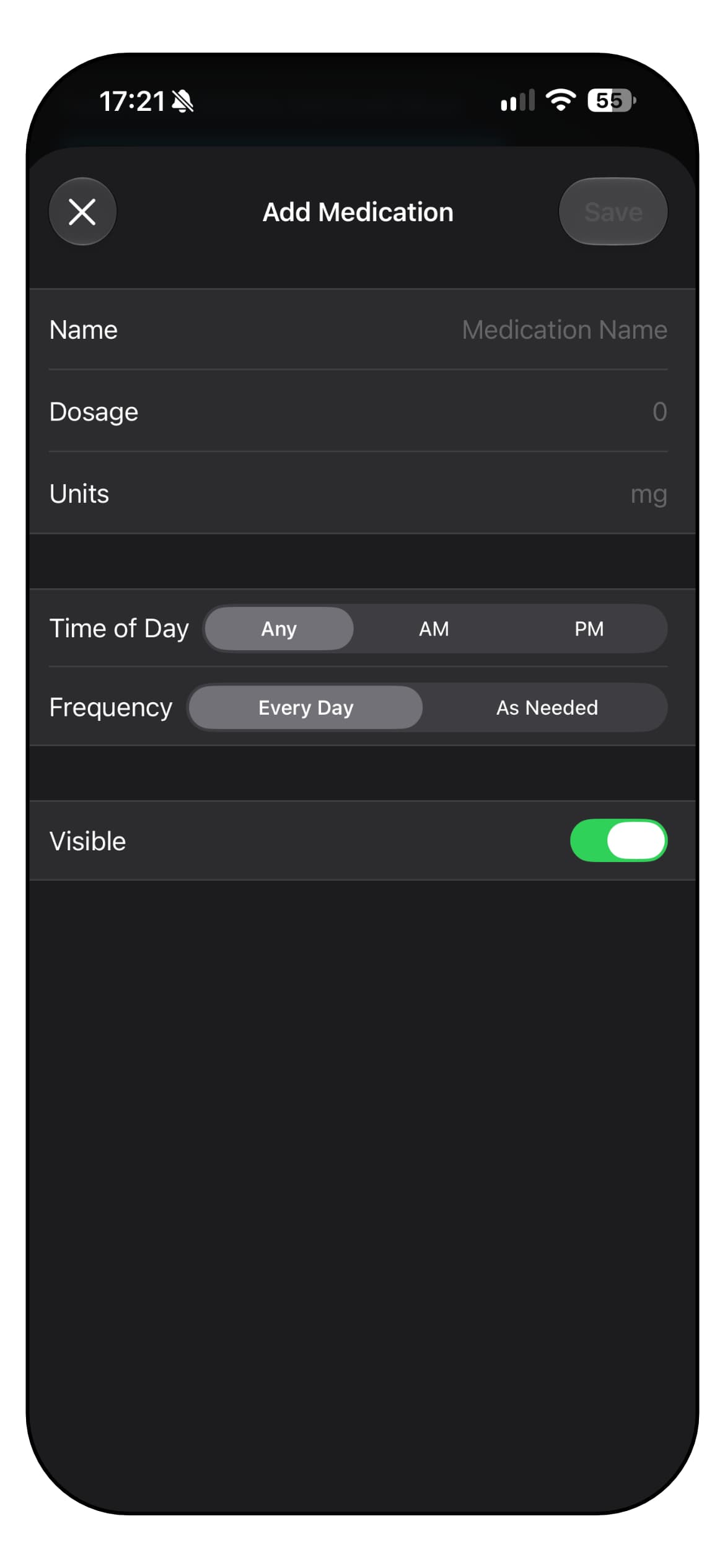
The eMoods Add Medication form with name, dosage, units, time of day and frequency

Medication is where eMoods does the most. You keep a list of what you take, each with a dose and unit, a time of day, and whether you take it every day or as needed. You check each one off daily, or let the app mark them as taken for you. A dose can be changed for a single day or from a date onward, and the graph shows the change, which helps when you and your doctor are adjusting a prescription. Reminders can prompt you to take your medication and to fill in the day.

The other extra is the report. At the end of each month eMoods builds a printable PDF you can email to a doctor, a therapist or someone close to you, and your full data exports as a file on the free tier. Beyond that there is little. A Resources tab links out to a hotline, the eMoods blog and other pages outside the app, with nothing to read in the app itself. Its listings mention no widgets, watch app or goals. eMoods does one job and stops there.

WinnerTie

A tie. eMoods has a real medication log and a monthly report made for appointments, which matter a great deal if you are tracking alongside treatment. Luci has a watch app, widgets, articles, achievements and Sparks, and a free PDF report of its own. Which set is better depends on what you are tracking for.

Context and integrations

How much of the world around an entry the app can capture, by hand or from your phone: sleep, steps, weather, places, people, health data.

Luci

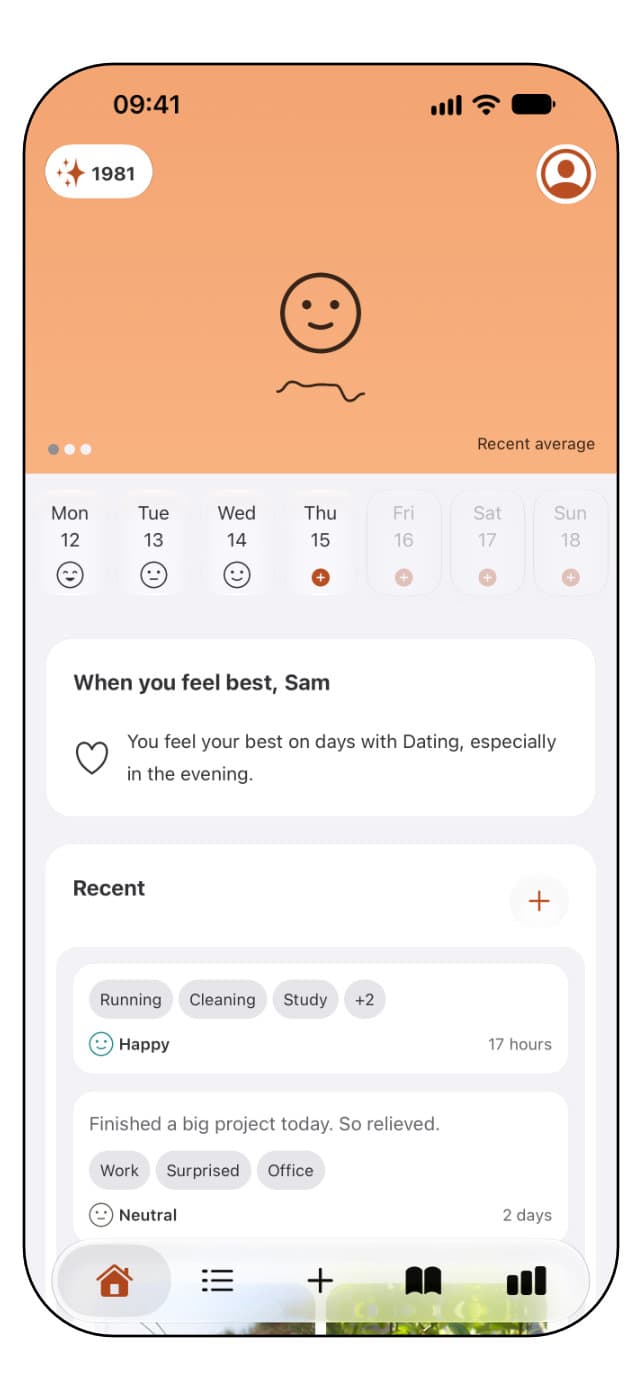
The Luci home screen with recent entries, their chips, and when you feel best

An entry in Luci can carry a lot of the world around it. People, places and activities are chips. Sleep and steps come in from Apple Health on iPhone once you allow it, so they sit beside a mood without being typed. A geotag attaches your location and the weather at the moment of writing, and a place can be pinned to a chip so it is selected automatically when you write from there. Nutrition, energy, rest and tension have their own sets, and so do recurring thought patterns like worry or self-judgement.

All of that becomes something the statistics can use. The steps card, the weather card, the location card and the people card each show how your mood moves with that input, and the impact ranking puts them all on one list. Health data read this way stays on your device. The limits are real, though. Luci reads sleep and steps only, and on Android the health connection is not currently available.

eMoods

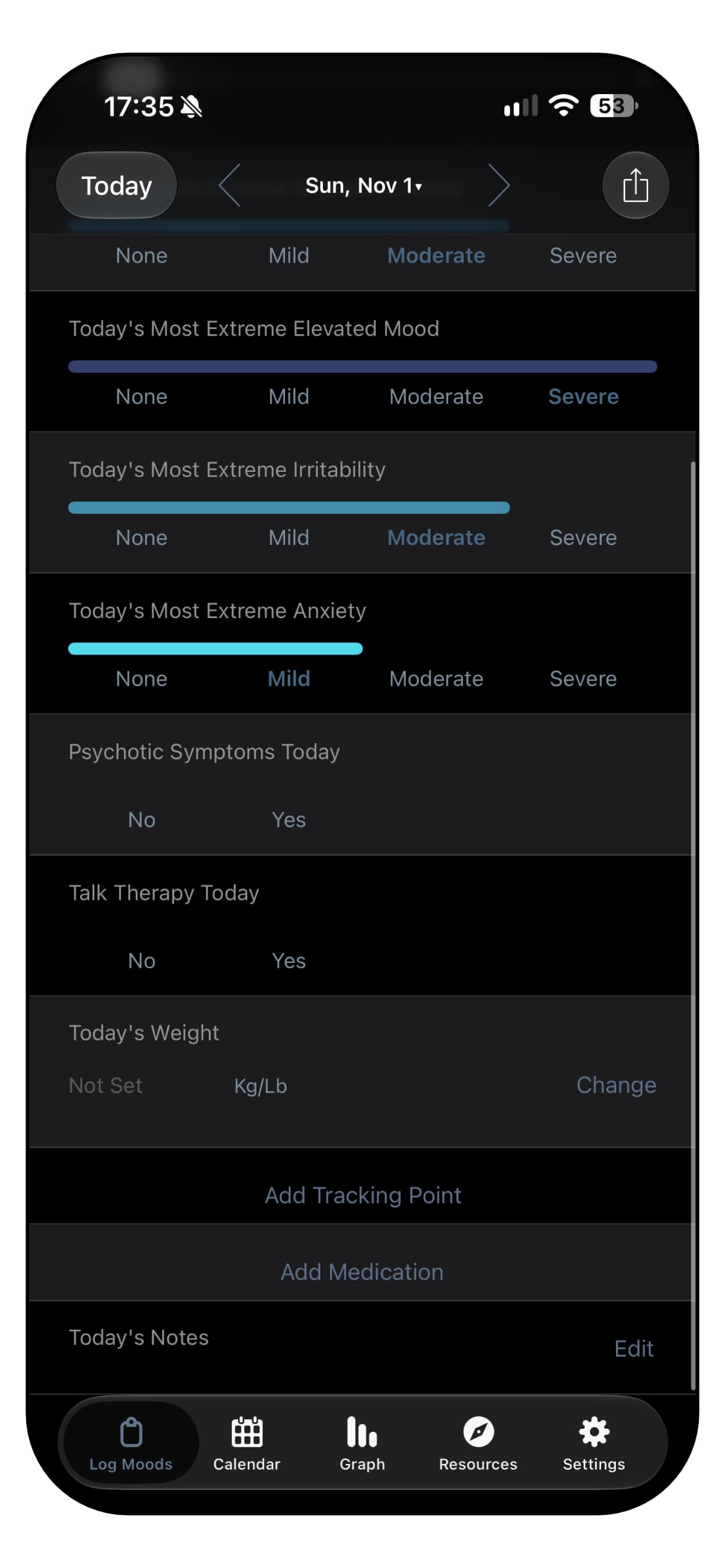
The lower half of the eMoods daily entry with yes or no points, weight, and buttons to add a tracking point or a medication

eMoods records the clinical side of a day. Sleep, medication and doses, weight, the menstrual cycle, whether you had talk therapy and whether there were psychotic symptoms are all default points you can switch on or off. Sleep is a slider on the daily screen, set in hours. On Android the app can connect to Health Connect and show your steps, sleep, weight, hydration and nutrition beside your entries, without saving them in the app.

The rest of the day is left out. There are no tags for the people you were with, the place you were in or what you did, unless you build them as custom points on the paid tier. Its iPhone listing mentions no Apple Health connection, and the phone app has no weather or location. Weather and daylight are part of eMoods Insights, the separate cloud tracker.

WinnerLuci

Luci. People, places, activities, sleep, steps, weather and location sit beside each mood as data the statistics can use. eMoods covers medication, weight and the cycle in more detail than Luci does, and leaves the rest of the day out.

Privacy

Where your entries live, who can read them, whether an account is required, and how easily you can leave with your data.

Luci

Luci needs no account and no email address. Entries live on the device you wrote them on, and every statistic is calculated there too, so the app works in full with no connection. Sync is off until you turn it on. Switch it on and your journal follows you between phone, tablet and watch, encrypted, tied to an account you create at that point and not before. Nothing you write is used to train anything, and nothing is sent to a model to be read.

Leaving is a two-tap operation: export the lot as a readable PDF or as a backup file you can import again later. If you never turned sync on, there was never anything on our side to delete; if you did, there is a page in the footer that explains exactly how to remove it. Purchases go through Apple or Google, and crash reports are optional and carry no journal content.

eMoods

eMoods is about as private as an app gets. There is no account and no login, and everything you enter stays on your phone. Its makers say the app never stores your data in the cloud and connects to no outside services, and both store listings agree: the App Store label reads Data Not Collected, and Google Play lists no data collected and none shared. The privacy policy for the phone app was last updated in January 2026.

The other side of that is that your data is yours to look after. There is no sync, so a backup is a file you export yourself, or whatever your phone's own backup includes, and moving to a new phone means exporting and importing that file. The file works across iPhone and Android. Data only leaves the device when you send a report or a backup. eMoods Insights is a different matter. It is a cloud service with an account and its own privacy policy, and nothing reaches it unless you import your data there yourself.

WinnerTie

A tie. Both need no account, keep entries on your device and do their work there. eMoods goes furthest, with no servers for your entries at all. Luci works the same way by default and adds encrypted sync for those who want their journal on more than one device.

Platforms

Where the app runs: iPhone, Android, iPad, watch, desktop, and whether your entries follow you between them.

Luci

iPhone, iPad, Apple Watch with its own app and complications, Mac with Apple silicon, Apple Vision, and Android. With sync on, one journal across all of them. Widgets on iOS and Android home screens, and the app in fourteen languages.

eMoods

iPhone, iPad and Android. The iPhone app can also be installed on a Mac with Apple silicon and on Apple Vision, though it is not verified for the Mac. The listing shows no Apple Watch app. Entries do not sync between devices, so you move them with an exported file. Seven languages.

WinnerLuci

Luci. Both cover iPhone, iPad and Android. Luci adds an Apple Watch app, sync between your devices when you want it, and seven more languages.

Pricing

What is free, what is paid, and roughly what the paid tier costs. Prices vary by country, so these are the options and a rough figure, not a quote.

Luci

Free, with no account, no ads and no time limit: mood logging, journaling, photos and voice notes, the statistics and pattern discovery, six of the twenty prompt topics, widgets and the watch app. Luci Premium adds sync across devices, the remaining guided prompt topics and the advanced statistics.

Premium is a subscription at roughly $6 a month or $35 a year, or a one-off lifetime purchase at roughly $200. A subscription bought on one platform works on the other once you sign in. There are also optional tips, which buy nothing and simply support a small team.

eMoods

eMoods is free for everything it was first built to do: the daily chart, medications, the graph, the monthly PDF report and the data export. Its makers say every feature from the first version stays free. The free app shows one banner at the top of the daily screen, the app's own request to upgrade and support its development. The Play Store listing carries no ads label.

The optional subscription, called Pro on the App Store and patronage by its makers, is roughly $2 a month or $10 a year in the US. It adds custom tracking points, timestamped notes, reports older than six months and a choice of app icon. On Android the help center also mentions a lifetime purchase. That is among the lowest prices of any app we compare. eMoods Insights, the cloud tracker, is priced separately, with a free tier and plans at roughly $50 and $100 a year.

WinnereMoods

eMoods. Both are free for the core with no account, and Luci's free tier includes far more analysis. When you do pay, eMoods costs roughly $10 a year against roughly $35, and that is hard to argue with.

The short version

Every category from the page above, in one table. Stars are our rating on a five-point scale; platforms and pricing are listed as they are.

CategoryLucieMoodsWinner
Look and feelSlider entry, warm and roomy, busier once fully set upPlain daily form, quick and clinical, one entry a dayLuci
InsightsPlain-language patterns, ranked influences, trends, freeMonthly graph and calendar, dose changes on the chart; no analysisLuci
CustomizationThree scales, eight icon sets, eight themes, custom chips, movable cardsDefault points on or off; custom points and app icon are paid; dark themeLuci
JournalingRich text, photos, voice, 550+ prompts, compare past answersA daily note; timestamped notes are paid; no promptsLuci
Other featuresWatch app, widgets, articles, achievements, SparksMedication log with doses, monthly PDF report, remindersTie
Context and integrationsApple Health sleep and steps, weather, geotag, people, placesSleep, medication, weight, cycle; Health Connect on Android; no weather or placesLuci
PrivacyOn device, no account, on-device analysis, opt-in encrypted syncOn device, no account, no data collected, manual file backupTie
PlatformsiOS, iPadOS, Android, Apple Watch, Mac, VisioniOS, iPadOS, Android; no watch app; no syncLuci
PricingFree core, no ads; Premium ~$6/mo, ~$35/yr, ~$200 lifetimeFree core; Pro ~$2/mo, ~$10/yreMoods

Conclusion

On the count, Luci takes six categories, eMoods takes one, and two are tied. The count hides how different the two jobs are. eMoods is a chart: a few taps a day, both ends of your mood marked side by side, medication next to them, and a report at the end of the month. It has done that one job since 2010, privately and for very little money. Luci is a mood journal. It asks how you feel as often as you like, records the day around it, and shows you what moves your mood.

Where Luci is stronger

  • Insight in plain words. It explains what moves your mood, ranks it by size, and keeps pattern discovery free.
  • Context filled in for you. People, places, sleep, steps, weather and location sit beside a mood without being typed.
  • Journaling. Over 550 guided prompts, formatting, photos, voice notes, and what you wrote last time the same question came round.
  • Reach. An Apple Watch app, sync between your devices, and fourteen languages.

Where eMoods is stronger

  • Both ends on one chart. Depressed and elevated mood are marked separately every day, which a single mood scale cannot show.
  • Medication. Doses, changes and missed days sit on the same graph as your moods.
  • Made for appointments. A printable monthly report, ready to hand to a doctor or therapist.
  • Privacy and price. No account, no data collected, and a paid tier at roughly $10 a year.

Choose Luci if

  • You want to know why some days are harder, and would like the app to explain what it found in plain words.
  • You want sleep, steps, weather and the people you were with in the picture without typing them in.
  • You want to write, with a prompt when you need one and a blank page when you do not.
  • Your mood moves through the day, and you want to log it more than once.

Choose eMoods if

  • You are tracking a mood disorder with a doctor or therapist and want a chart they can read at a glance.
  • You need depressed and elevated moods recorded separately, with medication and doses beside them.
  • You want the quickest possible daily entry and nothing else around it.
  • You want an app with no account that collects nothing, at the lowest price.

A fair way to decide is to ask who the record is for. If the answer is “my doctor and me, at the next appointment”, eMoods is built for exactly that. If the answer is “me, to understand what in my days is behind my moods”, Luci is built for that, and does it on your phone. Neither app diagnoses or treats anything, and neither replaces the professional you are working with. Both are free to try, and the two sit side by side easily: eMoods as the chart, Luci as the journal.

How this comparison was made

Both apps were used side by side on the versions above, on an iPhone, with the free tier and the paid tier of each. Ratings are on the same five-point scale used across every comparison on this site. eMoods is a registered product of its maker and is not affiliated with Luci. Prices are rough US figures and change by country; check the store listing for yours.

Common questions

  • Is eMoods free?

    Yes, for the core. The daily chart, medication tracking, the graph, the monthly PDF report and the data export are free, with no account. An optional subscription at roughly $2 a month or $10 a year adds custom tracking points, timestamped notes and older reports. Luci is free to use too, with mood tracking, statistics, pattern discovery, photos and voice notes included, and an optional Premium tier for sync, the full set of prompt topics and the advanced statistics.

  • Which app is better for tracking bipolar disorder?

    Neither is a medical device, and neither diagnoses or treats anything. eMoods was designed for this kind of tracking: it marks depressed and elevated mood separately, logs medication and doses, and prints a monthly report for a prescriber. Luci uses one mood scale that you can log several times a day, with emotions and context beside it, and its PDF export for a healthcare professional is free. Ask the professional you are working with what they would find most useful.

  • What is the difference between eMoods and eMoods Insights?

    They are separate products from the same maker. eMoods, the phone app compared here, keeps everything on your device and has no account. eMoods Insights is a tracker in the cloud that runs in a browser, needs an account, and adds things like weather and charts that plot one tracking point against another. The two do not sync automatically. You can import a file from the phone app into Insights by hand.

  • Can I move my entries from eMoods to Luci?

    Not directly at the moment. eMoods exports your full history as a file on the free tier, so it is easy to keep. Luci can import from Daylio and Pixels, and if you would like eMoods on that list, tell us at [email protected], because requests are how features get prioritized.

  • How current is this comparison?

    The date and version numbers at the top are the honest answer. eMoods changes slowly, and its iPhone and Android apps are updated on different schedules. If you spot something that is no longer true, we would rather hear about it than have you rely on it.

Try Luci for yourself

Free, works offline, no account needed. The fairest comparison is a week of your own entries.

Download Luci on the App StoreGet Luci on Google Play