When Tim Cook introduced the Apple Watch in 2014, he called it Apple's most personal device. It has stayed true to that promise ever since. From your wrist you can track your health, read a message, and control the devices around you. It also takes over many small tasks you would otherwise reach for your phone to do. One of those is staying in touch with how you feel.
Mood logging straight from your Apple Watch
When we designed Luci, we wanted logging your mood to be as easy as possible. With Apple Watch, you can check in with yourself whenever and wherever you are, in as little as ten seconds. Since Luci 4.0.0, released on 25 August 2026, the things you track sync to the watch too. The categories, the custom items you added, the order you put them in and the mood scale you picked on your phone are all right there on your wrist.
That sets Luci apart from many other mood trackers on the App Store. Daylio, for example, does not offer an Apple Watch app. Being able to log your mood the moment you notice it, without reaching for your phone, makes a real difference. We remember how a day ended more than how it went, and a feeling reconstructed three hours later is often the wrong one.
Can Apple Watch track your mood on its own?
Yes, in a simple way. Since watchOS 10, the Mindfulness app on Apple Watch has a State of Mind option. You choose whether to log how you feel right now or how you have felt overall today, turn the Digital Crown to set how pleasant or unpleasant it is, and then tap words for your feelings and for what is affecting you most. On iPhone, the Health app shows your entries over time, next to lifestyle factors such as time in daylight, sleep and exercise.
It is free and already on your wrist, so it is a good way to find out whether checking in suits you. A dedicated mood tracker app is for when you want more out of it:
- Your own things to track. In Luci you track the people, places, activities and emotions that make up your life, including items you add yourself, rather than a fixed list.
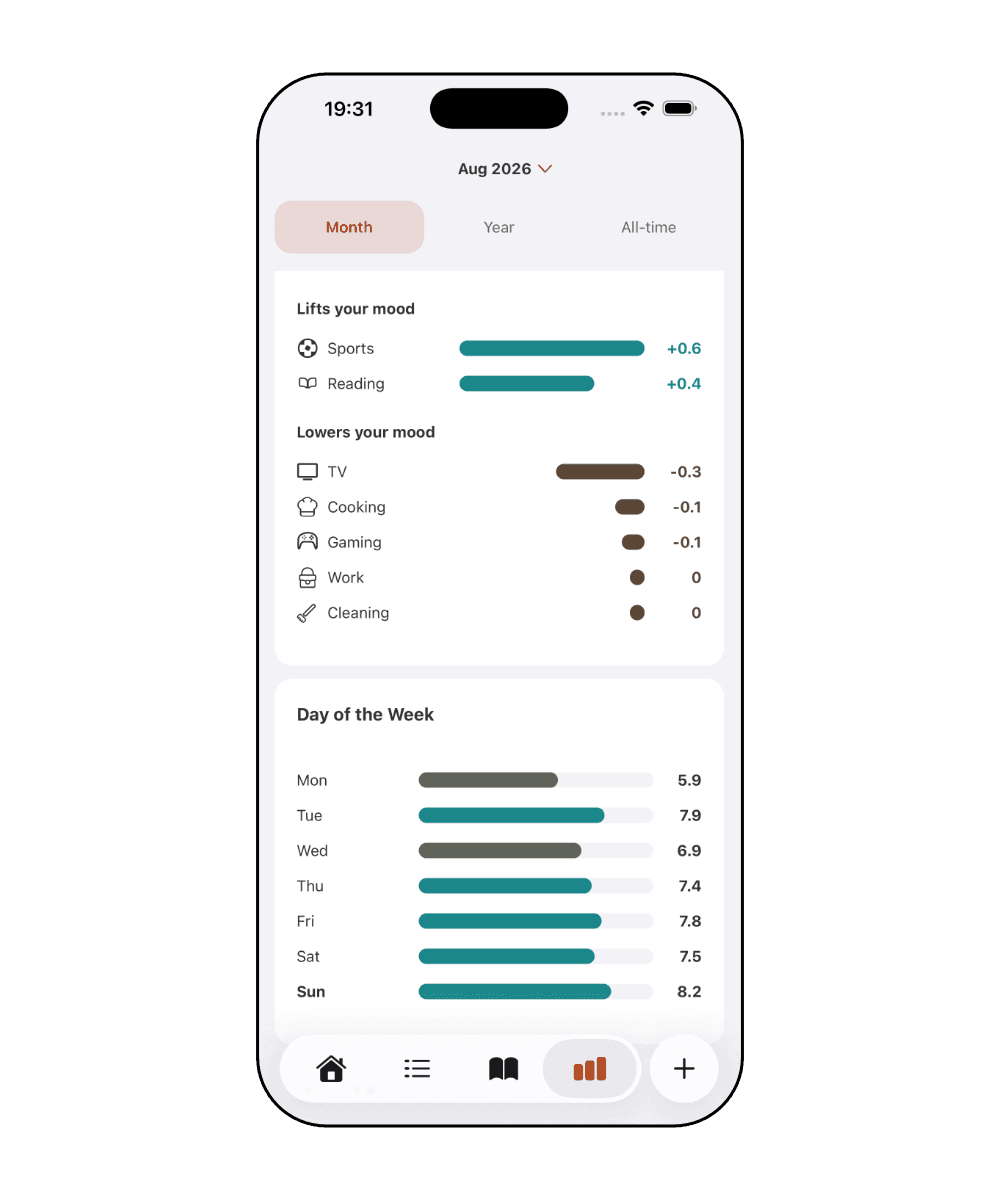
- Patterns explained. Luci ranks what lifts and lowers your mood and puts it in plain words, so you do not have to read it off a chart.
- A journal next to the rating. Write or dictate a short note from your wrist, and keep writing on your phone with prompts.
- Your mood on the watch face. Complications and a Smart Stack widget show your latest mood and your week at a glance.
Luci does not read or write Apple's State of Mind entries. Your Luci entries stay in Luci, on your device.
Which Apple Watch models work with Luci?
Luci's watch app needs watchOS 10 or later. That covers Apple Watch Series 4 and every newer Series, every Apple Watch SE, including the SE 3, and every Apple Watch Ultra. Like every Apple Watch, it works together with an iPhone, where Luci keeps your journal, your settings and your statistics.
Apple Watch Series 12 and Ultra 4
In September 2026, Apple released its latest models: Apple Watch Series 12 and Apple Watch Ultra 4. New this year is an updated SiP, the chip that powers the watch, which brings more on-device intelligence and improved, more continuous heart-rate sensing.
Our bodies may tell us a great deal about our mental well-being, so we are exploring support for more of what the watch can measure. That includes the relationship between heart rate variability (HRV) and mood, and possible connections between the new readiness scores, biological age and how we feel. None of this is a diagnosis. It is another pattern to notice, in the same way Luci already shows how places affect your mood.
The connection between exercise and mental health
A 2023 review published through the National Library of Medicine describes a meaningful connection between physical activity and mental health. Regular exercise and everyday movement are associated with lower levels of stress and anxiety and with a better mood overall.
Luci can read your sleep and step counts from Apple Health, with your permission, and place them next to your mood entries. Over a few weeks the impact ranking shows which of your activities lift your mood and which lower it, so you can see how your physical health may be influencing your mental well-being. For how daily step counts line up with mood, see Do your steps lift your mood?. Nothing read from Apple Health leaves your device.
How the Apple Watch app works
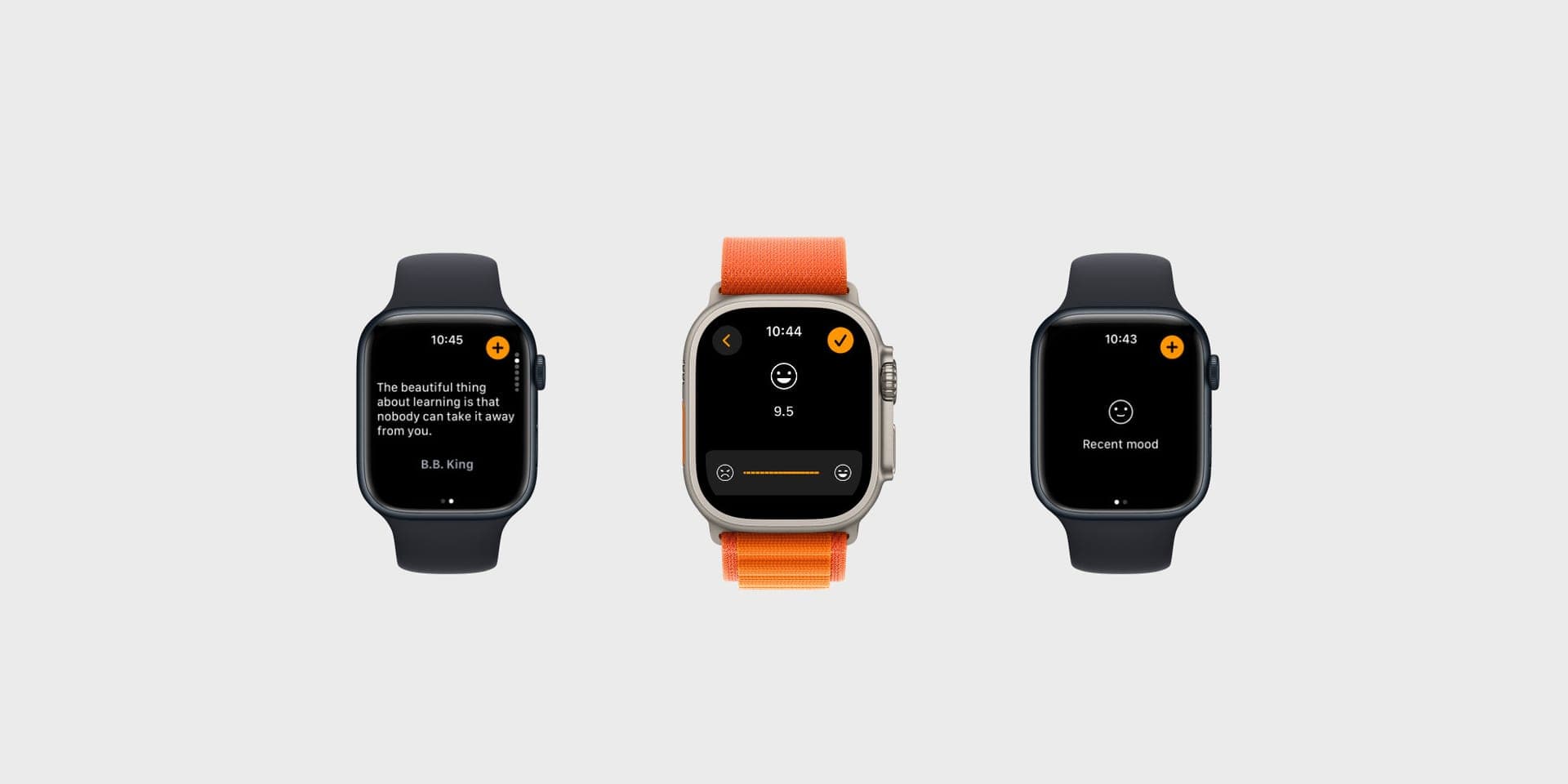
To make mood logging even quicker, add the Luci complication to your watch face. Press and hold your watch face, then tap Edit. Swipe to the Complications page and pick the slot where you want Luci to appear. Scroll through the list of apps, choose Luci, and pick one of the available complications. Luci offers circular, corner, inline and rectangular ones, so there is a fit for every face.
From then on, a tap on the Luci smiley opens the app. Tap the plus button to start an entry, pick your rating with the buttons or the Digital Crown, and tap Next. Just as on iPhone or Android, you can then add what may be behind the feeling. Every category you have switched on, such as people, activities and emotions, is listed on the watch, together with your own custom items in the order you arranged them. You can even write or dictate a short journal note from your wrist. Tap Finish and the entry is saved. If your phone is out of reach, the watch holds the entry and delivers it later.
Your mood at a glance: two new complications
Luci 4.2.0 adds two new ways to keep your mood on your wrist without opening the app.
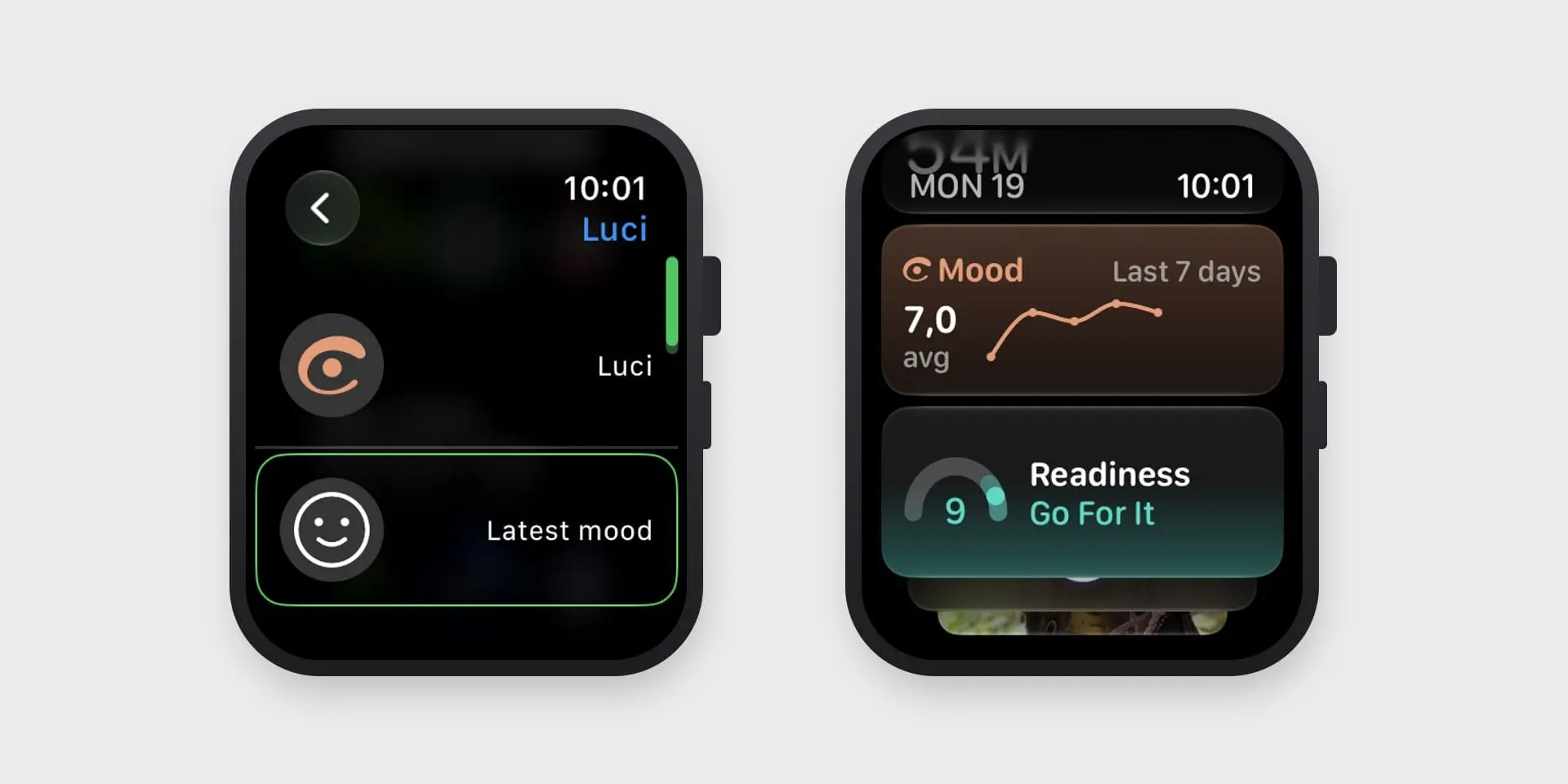
Latest mood. This complication shows your most recent mood right on your watch face, and it updates in real time as you log. Add it the same way as the other complications: edit your watch face, pick a slot, choose Luci and select Latest mood.
The Mood widget in the Smart Stack. Turn the Digital Crown on your watch face to open the Smart Stack, and Luci's widget shows your average mood over the last seven days with a small trend line. To add it, press and hold the Smart Stack, tap the plus button and choose Luci.
Why does this help? A few reasons:
- A gentle cue to check in. Seeing your last mood every time you raise your wrist is a quiet reminder to log how you feel now. That small nudge makes the habit easier to keep.
- The week, in one look. The trend line shows whether your week has been steady, rising or dipping, so you notice a change while it is happening, not weeks later.
- One tap to log. Both open Luci straight away, so a glance can turn into a ten second check-in.
- Nothing extra to do. Both update from the entries you already make. There is nothing to set up beyond adding them once.
As with everything in Luci, what you see is a pattern to notice, not a judgment or a diagnosis. A lower week is simply information, and a good moment to look at what may be behind it.
Tips for mood logging with Luci
Here are a few gentle tips to help you get started. Our goal is twofold: to give you a safe, private space to express how you feel, and to keep your data on your device so you can understand yourself better over time. With those insights you can make small, meaningful adjustments that help you feel your best.
Remove the noise
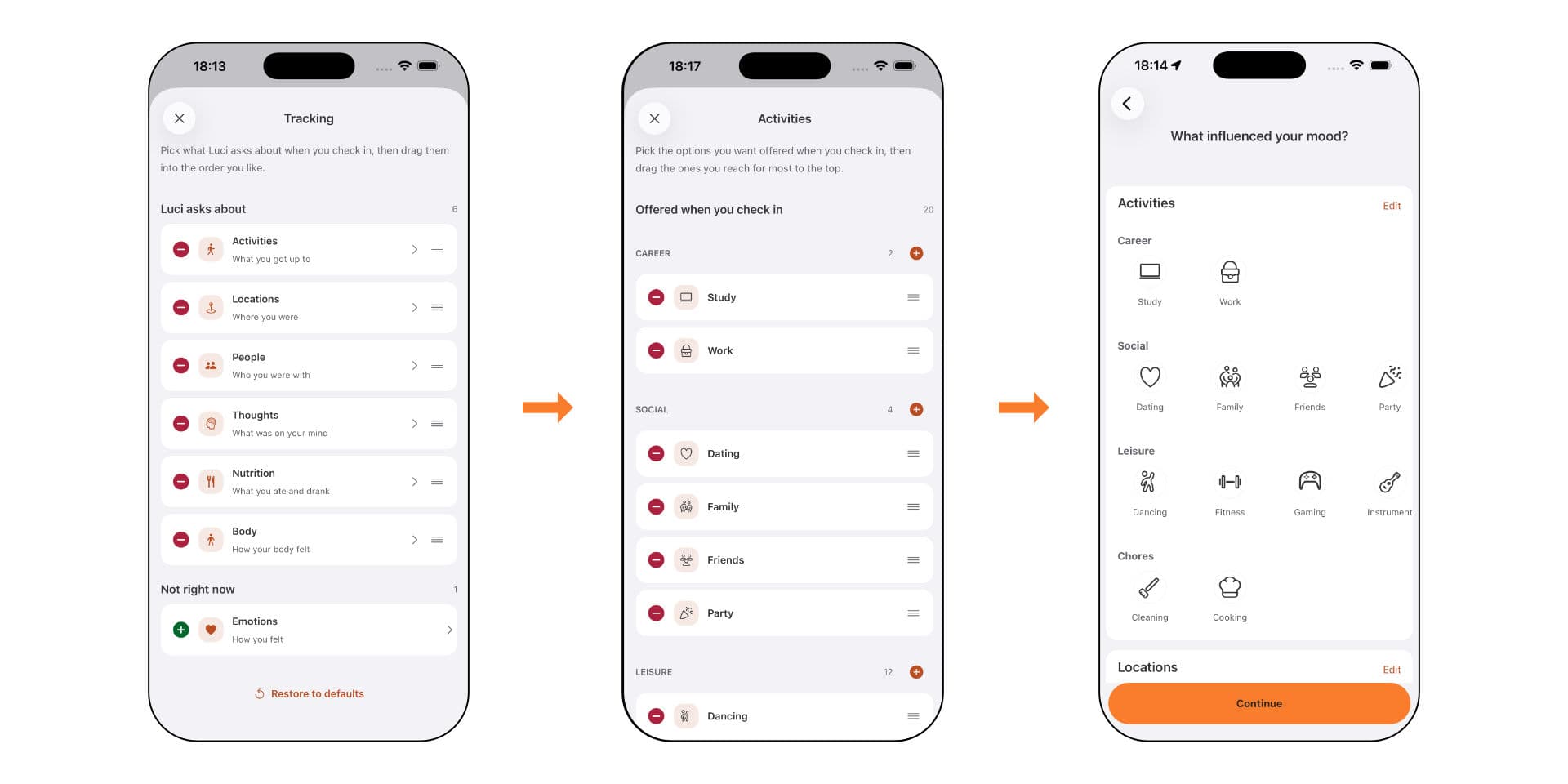
When you are just getting started, open Settings and choose what you track. Turn off any category that does not feel useful to you right now. You can bring it back later.
Then open the categories that do interest you and remove any items that do not fit your life. Reorder the rest so the ones you use most often sit at the top. On the watch, where a list is only a few rows tall, this matters even more. Read more about why custom items are worth the effort.
Select a scale
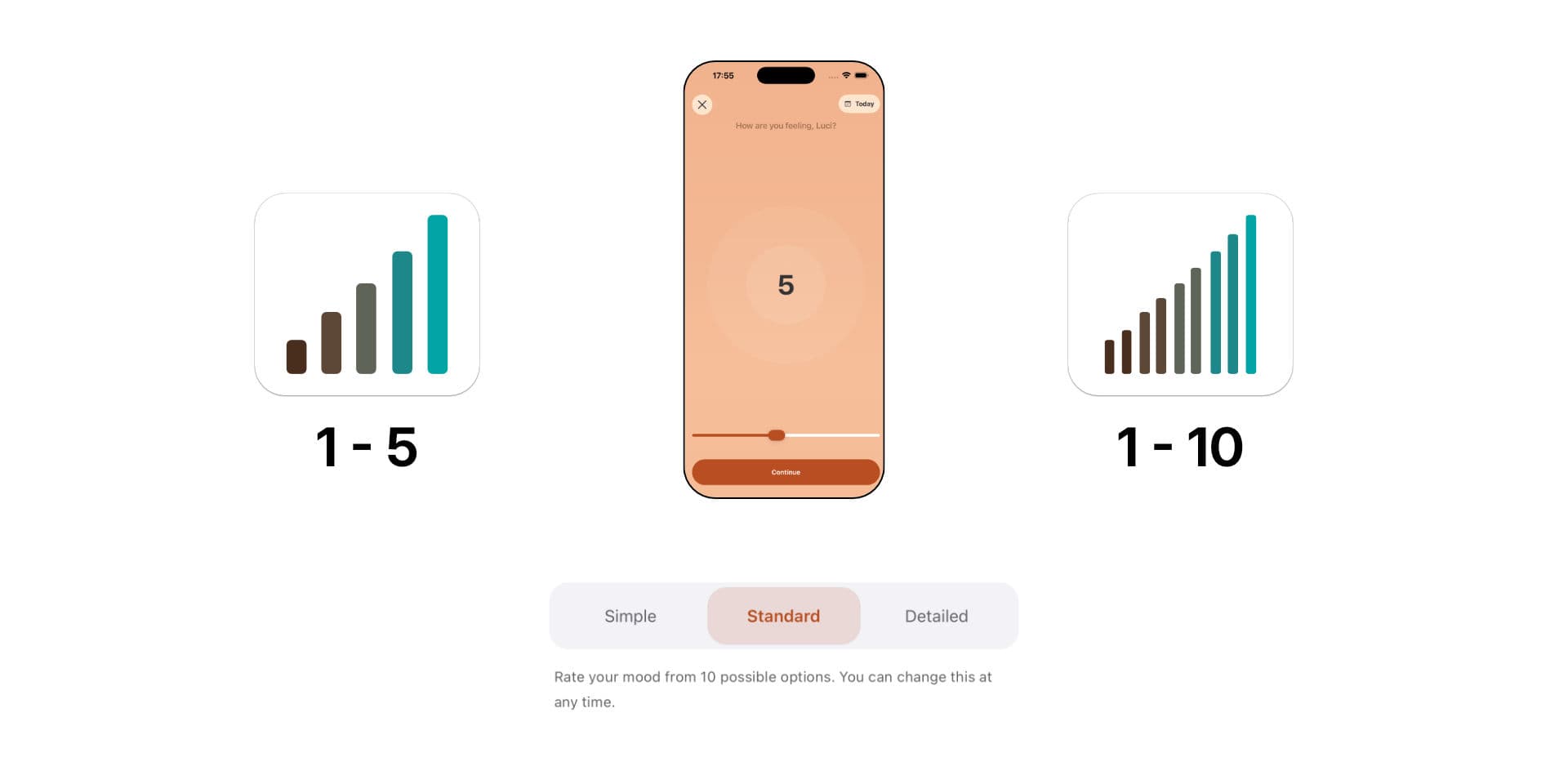
Luci lets you rate your mood simply, with five options, or in much finer detail, down to a tenth of a point. Standard, with ten options, sits in between. Pick the approach that feels right for you. We recommend starting with the standard scale, and you can change it whenever you like. The watch renders whichever scale you chose.
You may prefer to rate your happiness with numbers or with a smiley scale. As you use Luci, you unlock Sparks, which open up more ways to see your mood, including themes and new mood scales. If you want to understand what the numbers mean over time, read how happiness scores work.
Build the habit
Next, build the habit one small check-in at a time. Whenever you notice a strong feeling, tap the Luci complication and log your mood. Do this as often as you like through the day. Luci calculates the daily average for you, so several entries are better than one and none is wasted.
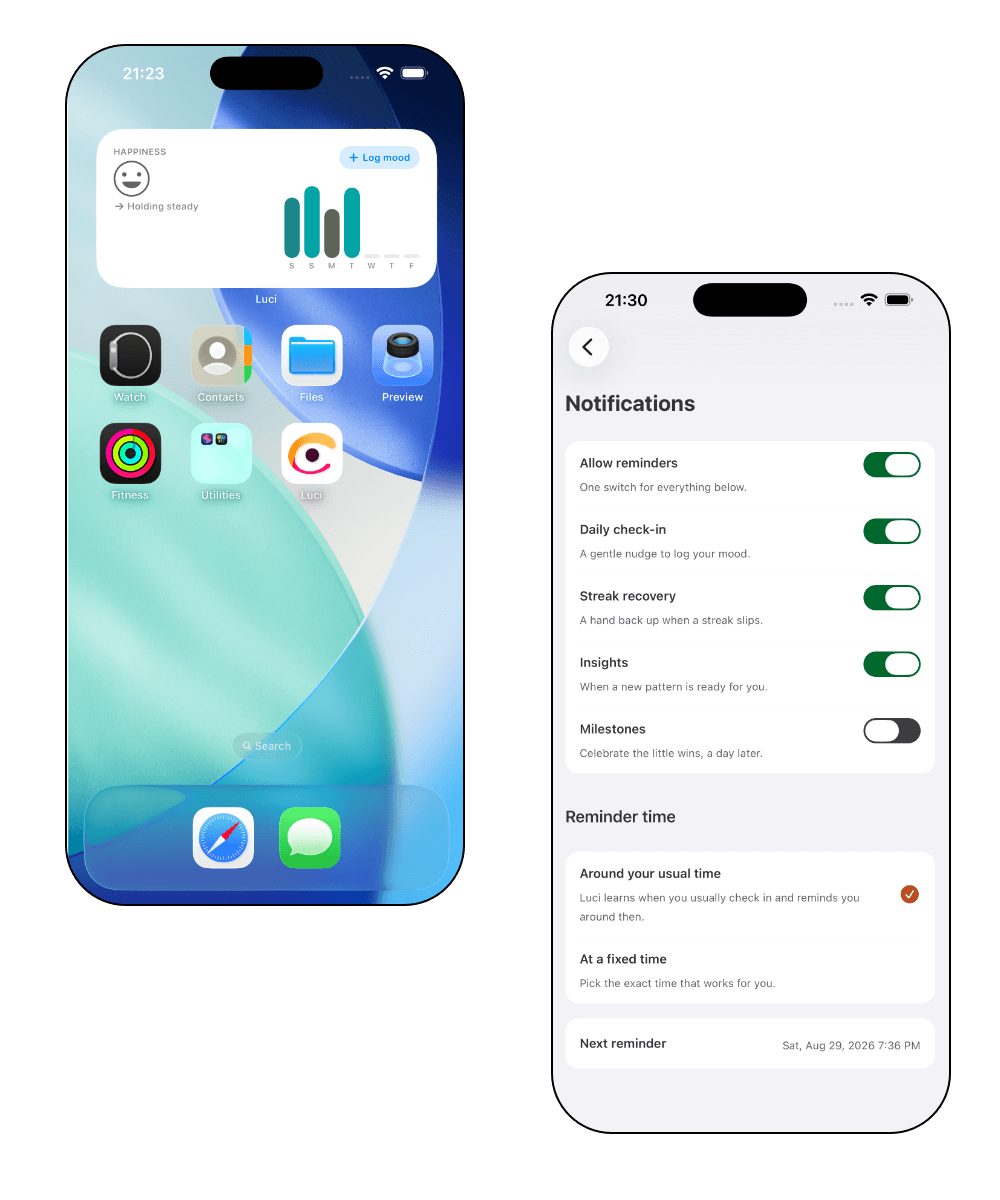
A gentle reminder helps in the first weeks. Luci can nudge you around the time you usually check in, and the home screen widget on your phone offers the same one-tap start as the watch.
By the end of the month you may have a clearer picture of the parts of your life that drain your energy and the ones that recharge you. Your Year in Pixels will start filling in too. You can find more tips in our mood tracking guides.
Conclusion
Mood trackers are a natural fit for a smartwatch. The best moment to log a feeling is the moment you have it, and the watch is the device you are already wearing when that happens. To build a healthy habit of checking in with your mental well-being, find a mood tracker that works for you. Fewer distractions and a check-in that takes ten seconds will help you stay consistent.
We keep exploring what Apple Watch can add to mood tracking, including HRV and other markers of physical health that may bring valuable new insights. If you want to see everything that arrived with the new Luci, start here.
Common questions
Does Apple Watch track your mood automatically? No. Apple Watch measures things like heart rate, movement and sleep, but mood is something you report yourself, whether in Apple's State of Mind or in an app like Luci. What the watch does well is make that check-in quick enough to do in the moment.
Can you track mood swings on Apple Watch? You can log your mood as often as you like through the day, which is how swings show up. Luci keeps every entry, works out a daily average, and shows your highs and lows, so a day that went up and down looks different from a steady one. If you are tracking mood changes for a condition such as bipolar disorder, share what you log with your doctor. A mood tracker shows patterns, it does not diagnose anything.
Does Luci work on Apple Watch SE? Yes. Luci needs watchOS 10 or later, which runs on every Apple Watch SE, Series 4 and later, and every Ultra.
Can I log a mood when my iPhone is not nearby? Yes. The watch saves the entry and delivers it to your iPhone when the two are back in touch.
Does Luci sync with Apple Health? Luci can read your sleep and steps from Apple Health, with your permission, to show them next to your moods. It does not write your mood entries to Apple Health, and nothing read from Apple Health leaves your device.
Sources (3)

Luci
Bringing light to your mental health journey.